

Key Takeaways
- A smooth EHR data migration starts from a clear data scope. Start by deciding what data to move and what to archive.
- Map every source field and test a sample of patients first to avoid costly prices later.
- Migration goes beyond go-live. Secure the transfer, verify the data, and maintain access to legacy records.
Imagine opening your new EHR on Monday morning and pulling up one of your patients’ charts. Patient information and progress notes are there, but the medication list is missing. Previously sent lab orders are not showing on the portal. And then your billers come and tell you that the claim didn’t make it over either.
You were promised a smooth transition, but you are trying to figure out how to recover the data. That’s not only your problem; 1 in 4 physicians who switched to a new EHR also report similar problems, making EHR data migration and patient safety risky.
The problem here is not the new EHR. It’s the EHR data migration.
This blog walks you through the complete EHR data migration process. From deciding what to move from your previous data to identifying the factors to consider for a new EHR, this guide covers everything you need to know for a smooth data transition.
What is EHR Data Migration?
EHR data migration is the process of transferring patient records, clinical data, and financial information from one EHR system to another.
Three terms get mixed up constantly when discussing data migration in healthcare, so let's separate them:
- Migration is the process of moving data from the old system to the new one.
- Conversion is the process of reformatting data so that the new system can read it (by changing field structures, remapping codes, and converting file types).
- Integration is the process of connecting the new system to other software you use (labs, pharmacies, billing clearinghouses).
This guide will cover migration and conversion. Integration is its own project and usually happens after your new EHR is live.
But before diving into the steps required for a smooth transition, you must know which data can actually be migrated to the new EHR, what may need to be archived, and what you can expect to see on day one.
What “Zero Data Loss” Really Means
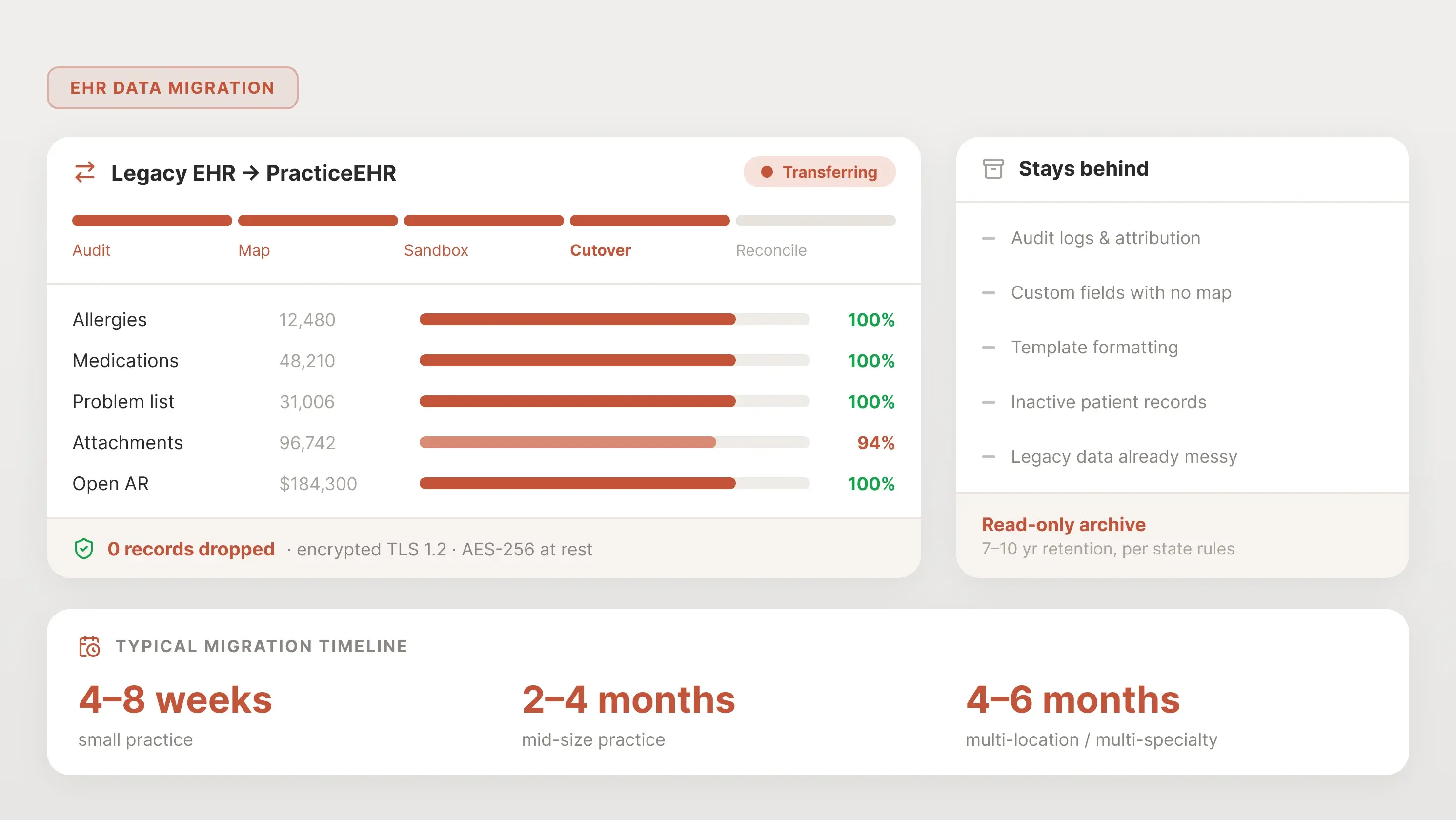
Every EHR vendor claims "zero data loss migration." Technically, no migration is 100% perfect. The honest version of the promise would be “no clinical and financial consequential loss, and nothing that affects patient safety, continuity of care, or your billing.”
Here's what a legitimate zero-loss migration actually delivers:
- 100% of structured clinical data (previous allergies, medications, lab orders, and immunizations)
- 100% of financial data reconciles to the dollars present in the previous EHR (open AR, patient balances, payment history, claims in flight)
- 100% of attachments transfer (scanned documents, external records, consent forms, images)
- All active patient records are accessible on day one without manual intervention.
Here's what it does NOT mean, no matter what the EHR vendor says:
- Formatting survives. Clinical templates, custom headers, color-coded toggle options, and workflow logic rarely migrate exactly as they were. The clinical text comes through, but not in the way it looked in the old system.
- Metadata stays as live data. Audit logs, user attribution, amendment histories, and timestamps are often archived separately rather than kept within the active chart.
- Custom fields have an automatic home. Anything you built custom in the legacy EHR must be either manually mapped or dropped. Fields with no destination don't move themselves.
- Historically inactive records come across live. Most migrations cover only active patients. Older records go to a read-only archive, not lost, but not in the new chart either.
- Legacy data that was already broken gets fixed. If allergies were entered as free text in the old system, they stay free text in the new one. Migration preserves data; it doesn't clean it.
The one question that separates serious vendors from oversellers: "What specifically is NOT guaranteed to migrate, and where will that data live after cutover?"
If the answer is "nothing, everything moves perfectly," the vendor is either lying or doesn't understand their own product. The honest answer is a written list of known exceptions. That list is what you should be reviewing before you sign.

5 Essential Steps for Smooth EHR Data Migration
A successful EHR data migration follows five steps in order. Skipping or rushing any one of them compounds risk in the next.
-
Audit and scope your data
You must make a list of all data stored in your current EHR before any data is moved. Count all active and inactive patients, catalog custom fields, list all attachments, pull your open AR total, and identify data types that may not migrate cleanly (SOAP notes, scanned PDFs, legacy code sets).
Then decide what type of data migration you want:
- Full migration — all structured, semi-structured, and financial data moves. Fits practices under 5,000 patients with clean legacy data.
- Partial migration — active patients only (seen in the last 2–3 years), plus open AR and current meds. Fits most mid-size practices.
- Archive-only — nothing moves live. All historical data is archived in a read-only archive. Fits practices sunsetting a legacy EHR with mostly inactive records.
Most practices land on a hybrid approach: active patients are fully migrated, inactive patients are archived. Define the scope in writing before you touch a field.
-
Data mapping — where migrations break
Data mapping is the process of matching source fields in your old EHR to destination fields in your new one. It sounds simple, but it is actually an arduous task.
Three things cause most mapping failures:
- Custom fields. Any field your old EHR lets you create (custom problem list items, specialty-specific intake fields, internal flags) has no automatic home in the new system. Someone has to decide where each one goes, or whether it goes at all. If you skip this step, you lose data.
- Dropdown value mismatches. Your old system might have "Hispanic/Latino" as a race option. Your new system might split it up by ethnicity. Multiply this across every structured field, and you get hundreds of micro-decisions to make.
- Code set reconciliation. ICD-9 to ICD-10, old internal CPT codes to current ones, deprecated SNOMED codes. If your legacy EHR is old enough to have ICD-9 diagnoses on inactive patients, those codes need to be translated or archived before migration.
Build a mapping spreadsheet before any data moves: every source field, every destination field, every exception. If your vendor doesn't give you one, make one.
One of PracticeEHR’s data migration specialists shared his experience. He told us
“Before we move any patient’s data, we map where every piece of data will live in the new EHR. Such a planning prevents any surprises after the EHR goes live later”
-
Run the sandbox test (don't skip this)
Before you migrate anything into production, pull a sample of 20 to 50 patients and run the full migration on them in a sandbox.
Have a clinician (not an IT person) open each test chart and check:
- Allergy list matches the old system exactly
- Medication list is complete, correct doses, correct dates
- The last 3 progress notes are present and readable
- Open AR balance ties to the old system's number
- Attachments (scanned docs, external records) are linked to the right patient
- Problem list is intact
- Immunizations are complete
Get a sign-off in writing before go-live. This is the single most important hour of the entire migration project.
-
Execute cutover — the freeze, sync, and go-live sequence
Cutover is the moment you stop using the old EHR and start using the new one. It has four phases:
- Freeze: Pick a date and time after which no new data gets entered in the old system. Usually, the end of business is on a Friday.
- Final delta sync: Any data entered between the main migration and the freeze gets moved over. For most practices, this is a few days of charts.
- Parallel run (optional): Some practices keep the old EHR available as read-only for 30 to 90 days while staff adjust to the new EHR. Both systems are visible; only one is used for new entries.
- Official cut. The old system goes read-only or offline. All new work happens in the new EHR.
Pick a cutover date that falls on a slow day for your practice. Avoid month-end, quarter-end, and the week before a holiday. If you have a satellite office, consider cutting them over first as a pilot.
-
Post-migration reconciliation
The migration isn't finished when the data lands. It's finished when the numbers tie.
In the first week after cutover, reconcile:
- Total patient count in the old system vs. the new system
- Total open AR in the old system vs. the new system (they must match to the dollar)
- Count of active medications per patient (sample 30 charts)
- Count of allergies per patient (sample 30 charts)
- Count of attachments per patient (sample 30 charts)
Keep a shared discrepancy log for the first two weeks. Every staff-reported issue goes in it. Patterns emerge fast, and most problems are fixable if you catch them within 14 days.
HIPAA During Migration — the Compliance Checklist
Data in motion is data at risk. HIPAA still applies at every step. Make sure your practice and the new EHR vendor adhere to the following HIPAA regulations:
- Signed Business Associate Agreement (BAA) with your new EHR vendor and with any third-party migration partner
- All data encrypted in transit (TLS 1.2 or higher) and at rest (AES-256)
- Access logs are maintained throughout the migration, showing who accessed what and when.
- Breach notification process documented before migration starts, in case something goes wrong
- Clear agreement with your old vendor on how long they retain your data after cutover and when it gets destroyed
- Audit trail of the migration itself: what moved, when, by whom, verified by whom
The U.S. Department of Health and Human Services treats migration as a covered activity. If PHI is exposed during the move, it's a reportable breach.
What Happens to Your Old EHR Data
After cutover, your old data has three possible homes:
- Read-only archive: Hosted either by your old vendor, your new vendor, or a third-party archiving service. Staff can log in and look up historical records, but can't edit them. This is the most common choice.
- Local backup: You take a full extract and store it on your own servers or in a HIPAA-compliant cloud bucket. Cheapest option. You're responsible for maintaining access.
- Vendor-hosted (old EHR): You keep paying your old vendor a reduced rate to maintain access to historical data. Easy, expensive, and ties you to a vendor you just left.
Retention requirements vary by state. Most require medical records to be kept for 7 to 10 years after the last patient encounter, longer for minors. Check your state medical board before you decommission anything.
Don’t Let Your EHR Switch Become a Data Loss Problem
A successful EHR data migration is about more than transferring PHI. It requires careful data mapping, testing, secure transfer, and post-migration reconciliation to ensure data is transferred without any loss.
PracticeEHR’s data migration specialists help plan, map, test, and verify your data before go-live. Ready to switch with confidence? Talk to PracticeEHR about your EHR migration today.
Explore more: New EHR, Big Decision: What Should You Consider First?

.svg)
