Update – April 2026
OVERVIEW OF UPDATES
New Visit Creation in PracticeEHR Go Mobile Application
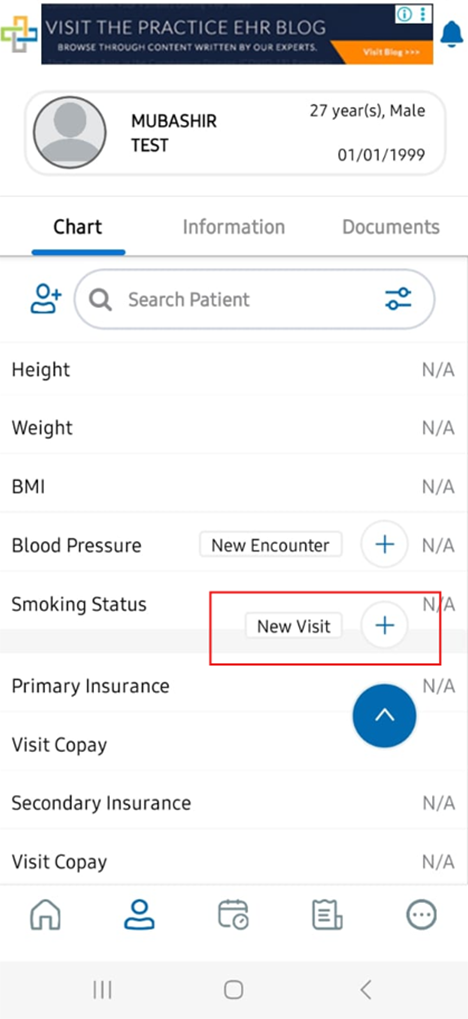
The PracticeEHR Go mobile app now supports creating a new patient visit directly from the Patient Chart screen. This enhancement allows users to quickly initiate a visit workflow from within the patient’s chart and proceed to documentation based on the selected visit template.
What’s New
A New Visit option is now available on the Patient Chart screen and Patient In Office. When the user taps New Visit, the system navigates to the Start Process screen, where the user can enter the required visit information before starting.
Workflow
From the Patient Chart screen, the user selects New Visit. The system opens the Start Process screen, where the user is required to complete key fields such as:
-
Provider
- Location
-
Plan
- Template

After entering the required information, the user taps Start Visit. The system then starts the new visit and displays the visit documentation fields according to the selected template.
The template-driven behavior aligns with the existing PracticeEHR template workflow, where visit templates are configured with sections, chief complaints, and related clinical content.
Additional Workflow: Start Visit from Patients In Office
Users can also start a visit from the Patients In Office screen in the PracticeEHR Go mobile application.
Navigation
Home > Activities > Patients In Office > Start Visit
From the Home screen, the user opens the Activities tab and selects Patients In Office. The system displays the list of checked-in patients currently available in the office.

On the patient card, the user taps the three-dot menu and selects Start Visit. The system then starts the visit workflow for that patient and navigates the user to the visit documentation screen.

Result
Once the visit is created successfully, the system displays the visit in In Progress / Not Billed status and allows the user to continue documenting the encounter using the fields associated with the selected template.

User Benefit
Previously, the New Visit Creation feature was not available in the PracticeEHR Go mobile application. Users could not start a new visit directly from the mobile app.
With this update, users can now create and start a new visit directly from the Patient Chart screen in the mobile application. This improves accessibility, reduces workflow dependency, and allows providers and staff to begin visit documentation more efficiently while using PracticeEHR Go.
CareLink Appointment Integration with PracticeEHR
PracticeEHR now supports API integration with CareLink to help streamline house-call appointment scheduling and appointment syncing between CareLink and PracticeEHR.
What’s New
CareLink is used by clients as their mapping and scheduling system for house-call operations. Through this integration, appointments created and managed in CareLink can be pushed into PracticeEHR, reducing manual entry and improving scheduling accuracy.
Integration Workflow
The integration is designed to support the following workflow:
-
The client schedules house-call appointments in CareLink.
-
CareLink manages the routing of patient visits based on geographical zones.
-
Appointment details are shared with PracticeEHR through API communication.
-
PracticeEHR receives the appointment information and creates or updates the appointment record.
- The synced appointment becomes available in PracticeEHR for scheduling and visit management workflows.
Technical Scope
The implementation includes establishing API communication between CareLink and PracticeEHR, mapping the required endpoints, and confirming the required appointment fields for successful data exchange.
The team will validate the full appointment syncing flow to ensure that appointments pushed from CareLink are correctly received and reflected in PracticeEHR. Any required adjustments on either the CareLink side or PracticeEHR side will be reviewed and guided technically during the integration process.
Result
Once the integration is completed, house-call appointments scheduled in CareLink should sync into PracticeEHR successfully with the required appointment details, allowing the client to continue using CareLink for scheduling and routing while maintaining appointment records inside PracticeEHR.
User Benefit
Previously, the client had to depend on separate workflows between CareLink and PracticeEHR for house-call scheduling and appointment management.
With this integration, users can schedule and route patient visits in CareLink while having those appointments automatically pushed into PracticeEHR. This reduces duplicate work, improves appointment accuracy, and supports a smoother workflow for house-call visit management.

Tried and Trusted by Thousands of Providers