

Key Takeaways
-
Patient intake software digitizes forms, check-ins, and payments, reducing manual data entry and speeding up check-in.
- The right software should integrate directly with your EHR/practice management system and support HIPAA requirements.
- Before buying, evaluate total cost, insurance verification, customization, and what happens to your data if you leave.
Manual patient intake costs the average small practice 15 to 20 minutes per patient, and that number does not include the rework when a form comes back with a missing signature or an insurance card photocopied at the wrong angle. Multiply that by 25 patients a day, and the front desk is spending roughly six hours on paperwork alone. Patient intake software is what most practices switch to when that math stops making sense.
This guide covers what the software actually does, how it fits into the front-office workflow, and what to look for when you compare options.
What Is Patient Intake Software?
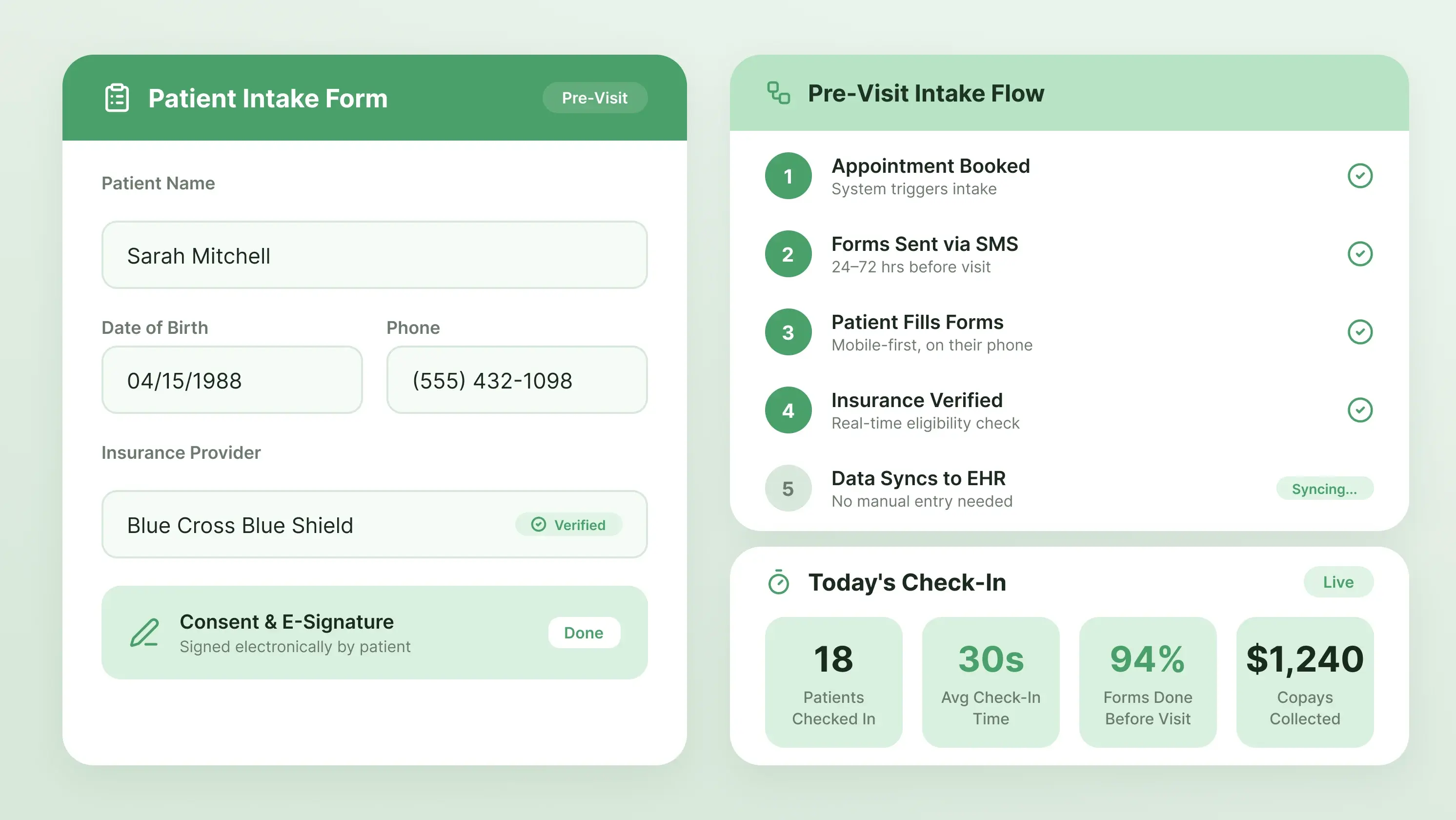
Patient intake software is a tool that handles the paperwork side of a patient visit. It sends the forms before the appointment, collects the answers on the patient's phone or laptop, verifies insurance in the background, and drops the data straight into your EHR, so the front desk doesn't have to type it in.
It sits close to a few other tools that people confuse it with. An EHR is where clinical documentation lives. A patient portal is where patients look up lab results and message the provider. A check-in kiosk is a tablet in the waiting room. Patient intake software overlaps with all three but is built for one job: getting the pre-visit administrative work done before the patient walks in.
For example, PracticeEHR's Patient Check-in Kiosk combines digital check-in with several parts of the intake process. Patients can use a kiosk to provide identification and insurance information, complete intake and consent forms, sign documents electronically, and make payments.
How Patient Intake Software Works?
The typical flow has seven steps.
- Your patient books an appointment.
- The software sends a text or email with a link to the intake form, usually 24 to 72 hours before the visit.
- The patient fills it out on their phone.
- Your patient can take photos of their insurance card and ID, e-sign the consent forms, and pay a copay if you have that switched on.
- The software verifies insurance eligibility in real time against the payer
- The data syncs to the EHR.
- The provider opens the chart, and the history is already there.
None of the steps is new. What is new is that none of them require staff attention unless something breaks. That is where the time savings come from.
Online Patient Intake forms
Digital forms are the core of the whole system. Get these wrong, and nothing else matters.
The good ones are mobile-first, meaning they work on the phone the patient is holding, not just on a desktop. They use conditional logic, so a patient who says "no" to being pregnant does not have to answer twelve pregnancy-related follow-ups. They support HIPAA-compliant e-signatures. They save progress as the patient goes, which matters because most people fill these out on a lunch break in three sittings.
Custom form building is another thing to look for. A dermatology practice does not need the same intake as a pediatric clinic. If you cannot edit the forms without calling support, you will hate the software within a month.
7 Benefits of Using Patient Intake Software
Patient intake forms do more than just replace the paper forms. Here are seven ways it can improve efficiency, accuracy, and the overall patient experience.
-
Patients actually prefer it
Given the choice, most people fill out forms on their phone at home. It's not dramatic. It's just less annoying than a clipboard in a room full of coughing strangers.
-
Check-in stops eating in the morning
If scheduling and insurance are already done, check-in takes about 30 seconds. Providers run closer to schedule. The lobby thins out. That's most of the pitch right there.
-
No-shows go down
Reminders that also nudge patients to finish their forms give them a few extra touchpoints before the visit. It won't fix chronic no-show patients, but it moves the number.
-
Fewer claim denials from bad data
A huge share of denials trace back to a wrong policy number or a misspelled name. When the patient types it in themselves, with required fields, you catch most of that at the source instead of a month later.
-
Your front desk gets breathing room
Scanning, filing, calling patients to chase missing info, that's the part everyone hates. Taking it off their plate isn't glamorous, but it's the difference between a stressed team and a team that can actually answer the phone.
-
HIPAA gets simpler
Paper forms get left on counters. Digital intake is encrypted, access-logged, and traceable. Not exciting. Just harder to mess up.
-
Money comes in earlier
When patients see the copay and outstanding balance before the visit, a lot of them just pay it. Not all of them. But enough that upfront collections usually climb noticeably in the first few months.
7 Questions to Ask the Vendor Before Choosing Your Patient Intake Software
Choosing the best patient intake software is challenging, especially when multiple vendors are claiming to be the best fit for your practice. Consider the following seven questions to ask vendors during the live demo.
-
Does it integrate directly with our EHR/PM system?
Integration is the make-or-break factor. If the intake software doesn't push data directly into your EHR and practice management software, your staff will end up re-entering everything by hand, defeating the whole purpose of digital intake.
Ask the vendor exactly how the integration works: is it a true bidirectional API, an HL7 interface, a FHIR-based connection, or just a CSV export you upload manually? Confirm they've integrated with your specific EHR before (not just "we can integrate with anything") and ask for the names of practices already using that integration.
-
Are you HIPAA compliant, and will you sign a BAA?
HIPAA compliance isn't optional, and a Business Associate Agreement (BAA) is the legal document that holds the vendor liable if patient data is breached. Any vendor that hesitates, charges extra for a BAA, or offers a watered-down version is a red flag. Walk away.
Beyond the BAA, ask about their specific safeguards: data encryption at rest and in transit, access controls, audit logs, employee background checks, and the physical location of data (US-based servers matter for many payers).
-
What's the total cost, including setup, per-patient fees, and add-ons?
Vendors love to advertise a low monthly base price and bury the real costs in add-ons. Get a written quote that includes: setup/implementation fees, monthly subscription, per-provider or per-user charges, per-patient or per-form fees, integration/interface fees (often a separate one-time cost), eligibility verification costs, payment processing fees, training, and support tier upgrades.
Ask specifically what happens if your patient volume grows. Do costs scale linearly? Also ask about contract length, auto-renewal terms, and price-lock guarantees. A "cheap" solution at $200/month can easily become $2,000/month once everything is added.
-
Does it include real-time insurance eligibility verification?
Eligibility verification saves your front-desk hours and prevents denied claims. Ask if it's built in or an add-on, and which clearinghouse they use. Confirm which payers are supported — some vendors claim "270/271 support" but only work with major commercial payers, leaving Medicaid or regional plans out.
Ask how the results are displayed to staff: a clean summary of copay, deductible, and coverage status is far more useful than a raw data dump. Also, check whether verification runs automatically before appointments or only on demand.
-
What's your uptime SLA and support response time?
If the software goes down during morning check-in, your entire schedule falls apart. Ask for a written uptime guarantee, 99.9% is standard, anything less is weak. Find out what happens if they miss it (e.g., service credits or refunds). Then dig into support: What are their hours? Is phone support included or email-only?
Ask if support is US-based, and whether there's a self-serve help center, video library, or user community. Cheap support tiers usually mean long waits when something breaks.
-
How long is the implementation, and what's your training/onboarding process?
Implementation timelines are where vendors are most optimistic and most wrong. Ask for a realistic go-live date based on similar practices. A solo practice might launch in 2 weeks, a multi-location group could take 2-3 months. Get clarity on who does what: does the vendor build your custom forms, or do you?
Ask about the format (live sessions, recorded videos, on-site) and whether there's a dedicated implementation manager. Also, ask what "go-live support" looks like in the first 30 days; that's when most issues surface.
-
What happens to our data if we cancel?
Data portability is often overlooked until it's too late. Ask specifically: If we cancel, in what format do we get our data back: CSV, PDF, HL7? How long do we have to export it? Is there a fee for data export or offboarding? Do they permanently delete our data after termination, and will they provide a certificate of destruction?
Also, ask if patient records collected during your contract remain accessible for legal/audit purposes even after you leave. Vendors that make it hard or expensive to leave are betting you'll stay stuck; a good vendor makes exit as clean as onboarding.
Patient Intake Software vs. Patient Portal vs. Check-in Kiosk
During sales conversion, the three terms: patient intake software, patient portal, and check-in kiosk, are often confused, but they shouldn’t be. The table below is designed to explain that the three do different jobs.
Simplify Patient Intake With the Right Software
Patient intake is more than replacing the paper forms. When used efficiently, patient intake software alleviates front-desk workload, reduces manual errors, and speeds up the check-in process. But getting these benefits depends on choosing software that fits into your existing workflow rather than creating another system for your staff to manage.
PracticeEHR brings patient intake, check-in, insurance information, electronic forms, signatures, and payments together into a single connected workflow. Instead of doing everything manually, your team can spend less time on administrative tasks and more time focused on patients.
Ready to make patient intake faster and easier? Explore PracticEHR to see how a connected intake and practice management solution can simplify your front-office workflow.

.svg)
