

Is your practice struggling to overcome operational bottlenecks despite trying everything from hiring extra staff to outsourcing certain tasks? A reliable healthcare practice management software might be the answer...

“New and Improved” – we have all seen those words in bold letters on a commercial or sales flyer. But what is really new – improved? And do those changes really impact me? Within the world of software sometimes the new/improved is unintentionally hidden in the details of an update release. In 2020, Practice EHR will make a small change that will make a big difference to the return on your investment.
In addition to the industry standard update release recently posted to our Support Center portal, we will highlight key changes in a more causal blog format and also provide a short podcast video demonstrating how to use the key changes in your practice. Let’s get started with a few examples!
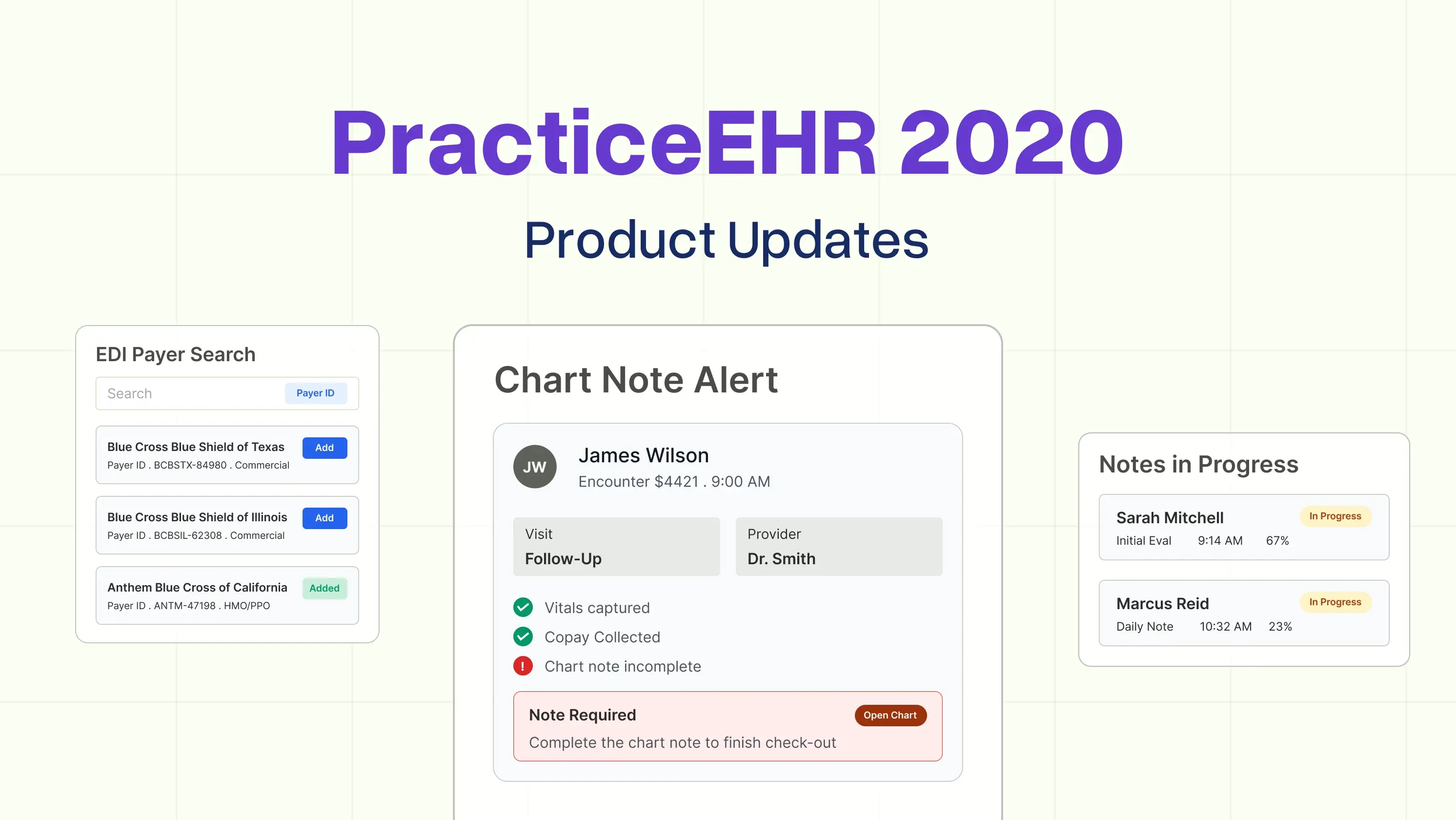
How do you ensure that each and every patient seen in your practice has a chart note to support the visit? Even a no-charge visit should have an authenticated note documenting the patient’s complaints/care/treatment plan. If you consistently use the check-in/check-out feature within Practice EHR, the system will now track this for you. When you “check-out” the patient, the system will alert you that a clinic visit has not been started. Once a visit has been initiated, the system will continue to track “notes in progress” and ensure that you capture each visit.
A new process has been implemented to add a new insurance plan to the system. To reduce the risk of a denied claim for incorrect information, the “import plan” button has been removed and replaced with an option to add a new plan using the new EDI payer ID search feature.
Annually the American Medical Association (AMA) reviews the use of the procedure codes and deletes those that no longer describe current practice. This helps reduce the risk of miscoding. We also review the use of the functions within Practice EHR and have deleted several data fields to reduce any misunderstanding that they were “required.” First, the claim status button was removed from the plan follow-up detail window. This function was not used from this screen. Also, the “From/To” date fields were removed from the practice location details under the Setup tab. These too were infrequently used and did not impact the results when they were used.
While Practice EHR support is always available to help with any modifications that are necessary, sometimes it is just better to be able to do it yourself. This release will offer you more control over the adjustments that may be needed within the patient’s ledger. You will find this new feature when you open the ledger menu from the Payment Batch Posting. From this same screen, you can simply “Adjust Ledger” for each patient with the option on the far right.
A full list of our latest updates is always available for reference in the support center tab in the system – look to the far right-hand side, towards the bottom. Directions can be helpful, but for those of us who would benefit from the “show me” learning method, quick videos will soon be posted to the Help Center. Each video will walk you through these and other updates that were included in this recent release. Stay tuned for more to come!
Topics: Practice EHR News, Product Updates, Client Favorites
RECENT POSTS


TOPICS
- EHR Solution (191)
- EHR (124)
- digital age (117)
- Patient Care (116)
- Medical Billing (110)
- Specialty-Specific EHR (110)
- Industry Update (97)
- Technology in Healthcare (84)
- EHR Features (79)
- Small Practice (77)
- Medical billing services (72)
- HIPAA Security (62)
- Integrated EHR (62)
- RCM (62)
- New Technology (44)
- Cloud-based EHR (43)
- Telemedicine (42)
- Healthcare Office Management (40)
- Practice EHR News (38)
- Kiosk (31)
- Revenue Cycle Management (28)
- AI Solutions (23)
- ePrescribing (21)
- AI Scribing (16)
- Best EHR Software (16)
- EMR (12)
- Practice Management Software (12)
- AI-powered Medical Billing (10)
- Client Favorites (10)
- Practice Automation (10)
- TeleVisit (10)
- The ONE (10)
- AI EHR (9)
- Switching to New EHR (9)
- MACRA/MIPS (8)
- Patient Portal (8)
- Urgent Care (8)
- AI Scribe (7)
- Best EHR Practice (7)
- EHR Integration (7)
- Psychiatry EHR (7)
- E-Prescribing (6)
- Product Updates (6)
- events (6)
- AI scanning (5)
- MIPS (5)
- Automated Health Tools (4)
- HIPAA (4)
- Insider (4)
- Internal Medicine EHR (4)
- MIPS Reporting (4)
- Mobile EHR (4)
- Orthopedics EHR (4)
- Podiatry (4)
- Podiatry EHR (4)
- Telehealth Platform (4)
- Chiropractic EHR (3)
- Digital Experiences (3)
- EHR Flaws (3)
- EHR Implementation (3)
- EHR for Chiropractors (3)
- EHR for Small Practices (3)
- Family Medicine EHR (3)
- Integrated Practice Management (3)
- Medical Practice Management Software (3)
- Patient Check-in Kiosk (3)
- PracticeEHR GO App (3)
- Regulatory Updates (3)
- Telehealth Platforms (3)
- Clearinghouse (2)
- Dermatology EHR (2)
- EHR Scheduling (2)
- Eligibility Verification in Medical Billing (2)
- Foot and Ankle Care (2)
- Foot and Ankle EHR (2)
- Health records 101 (2)
- Medical Coding Services (2)
- Medical Credentialing (2)
- Multilingual AI Scribe (2)
- Quality of Patient Care (2)
- Reporting Under MIPS (2)
- Risk and Liability in Medical Settings (2)
- What Works Clearinghouse (2)
- AI Scan (1)
- Bariatric EHR (1)
- Behavioral Health Practices (1)
- Billing Communication (1)
- Billing for Private Practices (1)
- Cardiology EHR (1)
- Cash Flow (1)
- Cashless Payments (1)
- Charting (1)
- Data Security (1)
- Dos and Don'ts (1)
- EHR Guides (1)
- EHR KPIs (1)
- EHR Questions to Ask (1)
- EHR Transition (1)
- EHR for Chronic Illness (1)
- EMR vs EHR Difference (1)
- ENT EHR (1)
- Endocrinology EHR (1)
- Family Medicine (1)
- Gastroenterology (1)
- Gastroenterology EHR (1)
- General Surgery EHR (1)
- Geriatric AI scribe (1)
- Geriatrics EHR (1)
- Guides (1)
- Healthcare Compliance Certification (1)
- Healthcare Practice Office Management (1)
- Help Center Videos (1)
- Insurance Reimbursement (1)
- KPI (1)
- Key Performance Indicators (1)
- Lab Processing (1)
- MACRA (1)
- Medical Billing Partner (1)
- Nephrology EHR (1)
- Neurology EHR (1)
- Pain Management EHR (1)
- Pediatrics EHR (1)
- Physical Therapy EHR (1)
- Practice Cash Flow (1)
- Practice Efficiency (1)
- Pulmonology EHR (1)
- Reconsider Your EHR (1)
- Simplify Practice Management (1)
- Staffing in Healthcare (1)
- Switch Medical Billing Providers (1)
- Urgent Care Medical Billing (1)
- Urology EHR (1)
- Voice-Activated AI Scribe (1)
- insurance claim denials (1)


